Written by Kelsie Pinkerton – 20+ years in the luxury wedding industry + now designing Showit websites built to help creatives get found, connect, and book the right clients with ease.
Quick Answer:
A Showit website can absolutely show up on Google — but only if it’s set up with the right structure from the start.
That means clear page titles and headings, intentional site organization, a properly connected blog through WordPress, and consistent, strategic content over time.
Most websites don’t struggle because of the platform they sit on. They struggle because of how they’re set up.
Why Most Showit Websites Don’t Get Found
Let’s start here, because this is where most people get tripped up.
If your Showit site isn’t showing up in search, it’s easy to assume:
- “Showit isn’t good for SEO”
- “Templates don’t rank well”
- “Google only likes custom websites”
But these are rarely the actual issues.
More often, it’s things like:
- No clear keyword focus on pages
- Multiple H1s, or none at all
- No blog or no strategy behind the blog
- No internal linking
- Images with vague file names
- Pages that look beautiful but say very little
If any of this feels familiar, this will likely resonate too: Why Your Photography Website Isn’t Booking Clients (Even Though It’s Pretty).
The good news? All of this is fixable.
✅ Step 1: Start with Clear, Searchable Page Titles
Before anything else, your pages need to be understandable — both to people and to Google.
That starts with your page titles.
Instead of:
- Home
- Experience
- Details
Think:
- Phoenix Wedding Photographer
- Destination Wedding Planner Based in Orange County
- Wedding Photography Packages and Pricing
The goal is not to sound clever here. The goal is to be clear.
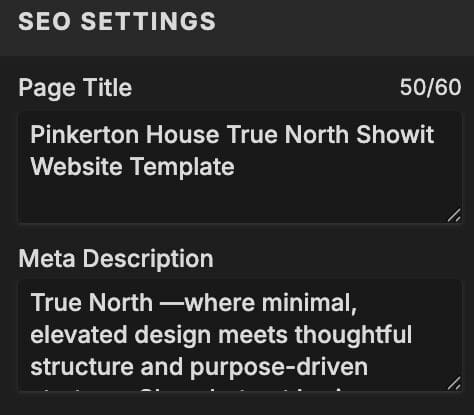
(In Showit, you’ll set your page title in the SEO Settings panel for each page — this is what shows up in Google search results and browser tabs, not necessarily the text you see on the page itself.)
For photographers, this is especially important because so many potential clients are searching by service, location, and style. Google needs to understand what you do before it can confidently show your site to the right people.
✅ Step 2: Use ONE Clear H1 Per Page
Your H1 is one of the strongest signals on the page.
If you’re unsure what this is, your H1 is the main headline of your page — the primary title that tells both your reader and Google what the page is about.
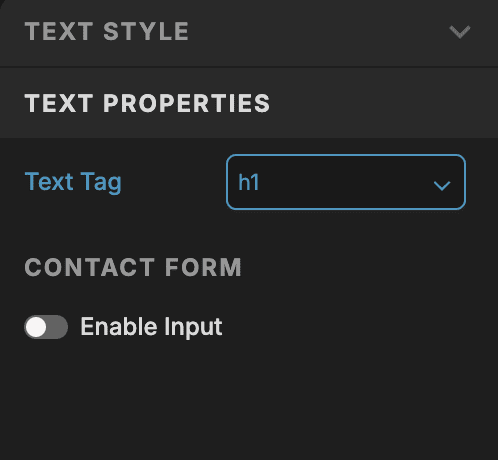
(This is separate from your page title in the SEO panel — both matter, but they serve slightly different purposes.).
And this is important — it’s not always the biggest or boldest text on your page — it’s the text specifically set with the text tag “H1” in your text properties. In Showit, you’ll find this in the text properties panel when you click on a text box.
It should:
- Clearly describe what the page is about
- Include your primary keyword naturally
- Appear once on the page
- Support the actual content on that page
All other page headings should fall under H2s and H3s so your page has a clear structure that Google can understand.
This is one of the biggest things well-built templates handle for you automatically — especially when they’re designed with SEO in mind.
If you’re not sure what that actually looks like in practice, start here: What “SEO-Friendly” Really Means in a Showit Template (and What You Should Look For).
✅ Step 3: Set Up Your Blog Strategically
This is where Showit becomes really powerful.
Your main site is built in Showit. Your blog is powered by WordPress.
But for SEO to work well, they need to feel like one cohesive website.
That means:
- Your blog lives on your main domain
- Your blog design matches the rest of your site
- Your categories are clear and useful
- Your posts are easy to navigate
- Your blog links naturally back to your core pages
If you’re still wrapping your head around how Showit and WordPress work together, this post will help: Showit + WordPress Blogging for Photographers: What to Know Before Choosing a Template.
The truth is, without a blog, it’s much harder to rank for multiple keywords, build topical authority, and regularly bring new people to your site.
With a strategic blog, you can consistently draw right fit clients to your site, even years after you’ve hit publish.
My own wedding photography blog regularly draws visitors to posts I wrote 10 years ago. And not just any visitors – ones that are looking for exactly what I offer and are ready to book. That is the value of a thoughtful, strategic blog that shows up in search.
✅ Step 4: Structure Your Pages So They’re Easy to Read and Crawl
Google doesn’t see your design the way you do.
It reads:
- Headings
- Text
- Links
- Structure
- Context
So your pages can’t just look nice, they need to follow a logical flow.
This looks like:
- A clear opening section that says what the page is about
- Sections that answer real buyer questions
- Short, readable paragraphs
- Helpful links to related pages or posts
- A natural, clear next step for the reader
This is also where many templates either fall short or become your best new employee. Structure matters more than aesthetics when it comes to SEO.
And if your bigger concern is whether your site is actually guiding visitors toward inquiry, this guide walks you through it step by step: Homepage Blueprint That Books.
✅ Step 5: Name and Optimize Your Images
This is one of the easiest SEO wins — and one of the most overlooked.
Instead of uploading an image named:
- IMG_4837.jpg
Rename it to something more descriptive, like:
- phoenix-wedding-photographer-desert-bridal.jpg
- destination-film-photography-santa-barbara.jpg
- luxury-rooftop-wedding-manhattan.jpg
Then add alt text that clearly describes the image.
You don’t need to stuff keywords everywhere. Just be specific, accurate, and relevant.
(It’s also worth optimizing your image file sizes — large images can slow your site down, which impacts both user experience and SEO. Showit recommends keeping images around or under 500KB when possible. A quick, easy way to do this is by running your images through TinyJPG before uploading.)
If you’re customizing a template, this is also a good reminder that your images are your superpower and a huge part of what makes your site feel unmistakably yours. This post goes deeper into that: How to Make a Showit Website Template Look Custom (Without Breaking the Design).
✅ Step 6: Use Internal Linking
Internal linking is one of those SEO things that sounds small, but it matters more than most people realize.
Every time you create a blog post or page, you have an opportunity to connect it to the rest of your site.
That can look like:
- Linking related blog posts together
- Linking from blog posts to your services or templates
- Linking from older posts to newer posts
- Guiding readers to the next logical step/page
Internal links help Google understand what your site is about. They also help real humans keep moving through your content instead of landing on one post and disappearing forever.
For example, if someone is learning how to set up their Showit website for SEO, it would make sense to also guide them toward How to Tell if a Showit Template Will Actually Help You Get Found (Before You Buy).
See what I did there 😉.
I always say: make it your goal to draw the right visitors down the rabbit hole of your blog and deeper into know, like, and trust with you. This is one of the most effective ways to communicate the value you bring and establish yourself as an easy ‘yes’ to your dream clients.
✅ Step 7: Keep Showing Up
This is the part people don’t love, but it matters.
SEO isn’t a one-time setup.
It’s:
- Publishing actually helpful content consistently
- Refining your pages over time
- Building depth around your topics
- Regulary answering the questions your ideal clients are already asking
You do NOT need to post constantly. But you do need to be consistent.
If you’re a photographer or wedding pro and you want a realistic approach to blogging without turning every post into stiff SEO homework, this will help: How to Blog a Wedding That Actually Gets Found (Without Sounding Like You’re Writing for SEO).
The Pinkerton House Perspective
Most photographers assume SEO is about doing more.
More content. More keywords. More effort.
But in reality, it’s often about doing the right things in the right order.
A well-structured website with clear messaging and thoughtful content will outperform a scattered, inconsistent one every time.
That’s why the goal isn’t just to have a website.
It’s to have one that:
- Makes sense to your ideal audience
- Makes sense to Google
- Supports your business as it grows
- Gives people a clear next step
That’s also why Pinkerton House templates are built with structure, SEO foundations, and conversion in mind from the start. Don’t get me wrong, “pretty” matters — it really matters for us photographers and creatives. But pretty without strategy is where a lot of websites quietly fall apart and miss the opportunity to consistently grow your business.
If you want the strategic foundation without having to build it all from scratch, you can explore the Showit Website Template Shop.
And if you’d rather have the setup and customization handled for you, my Website Design Experience was created for exactly that middle ground.
Key Takeaways
- Showit is absolutely capable of strong SEO — setup matters more than platform.
- Clear page titles and H1s are foundational.
- Your WordPress blog is a major visibility driver.
- Structure and readability matter more than design alone.
- Image naming and internal linking are easy wins.
- Consistency over time is what builds momentum.
FAQs About Setting Up a Showit Website for SEO
Is Showit actually good for SEO?
Yes — Showit can absolutely be good for SEO when the site is structured correctly. The platform itself usually isn’t the issue. Page titles, headings, content, internal links, blog setup, and consistency matter much more.
Do I need a blog for my Showit website to rank?
Technically, no. But practically? A blog gives you far more opportunities to rank for helpful, specific searches over time. If you’re a photographer, your blog can help you show up for venues, locations, services, and planning questions your ideal, ready to book clients are already searching for.
This post explains that setup more clearly: Showit + WordPress Blogging for Photographers: What to Know Before Choosing a Template.
Can a Showit template rank on Google?
Absolutely. A template-based website can rank well if it has strong structure, clear content, thoughtful page titles, and a blog strategy behind it.
If you’re shopping for a template and want to know what to look for, read this next: How to Tell if a Showit Template Will Actually Help You Get Found (Before You Buy).
What is the most important SEO step to focus on first?
Start with clarity. Your website should clearly communicate what you do, who you serve, where you work if location matters, and what the reader should do next. Without that foundation, the smaller SEO details won’t carry as much weight.
Do images matter for Showit SEO?
Yes, especially for photographers and visual creatives. Descriptive image file names, efficient file size, and helpful alt text can support SEO, but your images also help visitors understand your style, quality, and brand experience. Curate with intentionality – if it doesn’t represent work you’d like to do more of, it doesn’t belong.
What if I don’t want to set all of this up myself?
That’s where a strategic template or done-with-you/for-you setup can help. The Pinkerton House template shop gives you a strong foundation from the start, and my Website Design Experience is a good fit if you want help getting it customized and launched.
A Thoughtful Next Step
If you’re piecing all of this together on your own, get really familiar with my mantra: one. step. at. a. time.
Truly. You’ll be amazed how much less overwhelming a project like this can be if you remind yourself, on repeat, to take it one small step at a time.
Clean up your page titles. Check your H1s. Rename your most important images. Add a few smart internal links. Make sure your blog is connected and easy to navigate.
And if you’d rather not figure out all of the structure and setup yourself, that’s exactly what a strategically built Showit template is designed to support.
The goal isn’t just to launch a website. It’s to build one that actually gets seen by the right people. You got this 💪.
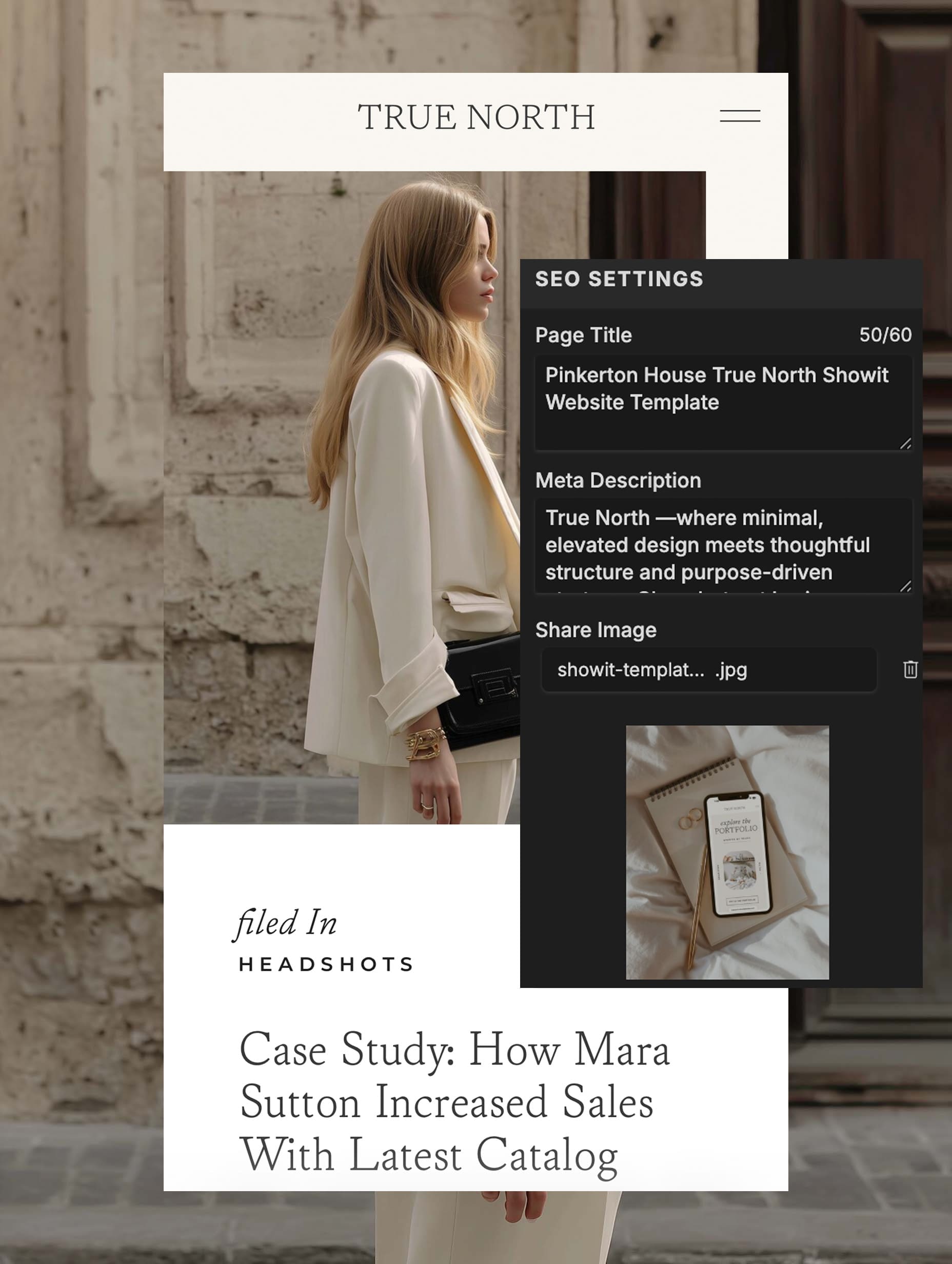
Kelsie Pinkerton is a Showit website designer and founder of Pinkerton House, with 20 years of experience in the luxury wedding industry.


